


SeekaHost India Logo SeekaHost India Logo
Login
  • Home
  • Domains
  • Hosting
  • About
SeekaHost Logo
Domains

  • ExcellentExcellentExcellent4.9 Reviews4.9 Reviews4.9 Reviews
  • ExcellentExcellentExcellent4.9 Reviews4.9 Reviews4.9 Reviews
Domains
  • Register a DomainRegister a DomainRegister a DomainHypeSecure your perfect domain.
  • Transfer DomainsTransfer DomainsTransfer DomainsMove your domain with ease.
  • Domain PricingDomain PricingDomain PricingExplore pricing across extensions.
Online Essentials
  • SSL CertificateSSL CertificateSSL CertificateSafeSecure websites with encryption.
  • E-Mail HostingE-Mail HostingE-Mail HostingProfessionalProfessional email for your business.
AI Tools
  • AI Domain Name GeneratorAI Domain Name GeneratorAI Domain Name GeneratorLive NowTry Hynts - domain ideas nobody has taken
  • Business Name CheckerBusiness Name CheckerBusiness Name CheckerCheck names for your business.
Take Your NameTake Your Name
Hosting

  • ExcellentExcellentExcellent4.9 Reviews4.9 Reviews4.9 Reviews
  • ExcellentExcellentExcellent4.9 Reviews4.9 Reviews4.9 Reviews
Website Hosting
  • Web HostingWeb HostingWeb HostingReliable hosting for every website.
  • Business HostingBusiness HostingBusiness HostingHotPowerful hosting for growing businesses.
  • WordPress HostingWordPress HostingWordPress HostingHypeOptimized hosting for WordPress websites.
  • WooCommerce HostingWooCommerce HostingWooCommerce HostingFast hosting for online stores.
  • Magento HostingMagento HostingMagento HostingPowerful hosting for Magento commerce.
  • Adaptive Core Security SuiteAdaptive Core Security SuiteAdaptive Core Security SuiteSafeguarding Your Website 24/7
Servers
  • VPS HostingVPS HostingVPS HostingFlexible virtual server resources.
  • Dedicated HostingDedicated HostingDedicated HostingPowerful dedicated physical servers.
  • n8n Self Hostedn8n Self Hostedn8n Self HostedTrendSelf-hosted workflow automation platform.
Panel Hosting
  • cPanel HostingcPanel HostingcPanel HostingEasy hosting with cPanel.
  • Plesk HostingPlesk HostingPlesk HostingSimple hosting with Plesk.
  • LiteSpeed HostingLiteSpeed HostingLiteSpeed HostingHotFaster hosting powered by LiteSpeed.
  • Reseller HostingReseller HostingReseller HostingHypeLaunch your own hosting business.
AI Tools
  • AI Domain Name GeneratorAI Domain Name GeneratorAI Domain Name GeneratorLive NowTry Hynts - domain ideas nobody has taken
  • Business Name CheckerBusiness Name CheckerBusiness Name CheckerCheck names for your business.
Explore HostingExplore Hosting
Launch ServersLaunch Servers
Explore PanelsExplore Panels
About

  • ExcellentExcellentExcellent4.9 Reviews4.9 Reviews4.9 Reviews
  • ExcellentExcellentExcellent4.9 Reviews4.9 Reviews4.9 Reviews
Learn
  • BlogBlogBlogHosting insights, tips, and updates.
  • TutorialsTutorialsTutorialsStep-by-step website hosting guides.
  • Hosting GuidesHosting GuidesHosting GuidesLearn hosting from basics.
Support
  • Knowledge BaseKnowledge BaseKnowledge BaseFind answers and solutions.
  • Submit a TicketSubmit a TicketSubmit a TicketRequest technical support assistance.
  • Server StatusServer StatusServer StatusLiveCheck current service availability.
Company
  • About UsAbout UsAbout UsDiscover our story and mission.
  • Contact UsContact UsContact UsGet in touch with us.
  • Affiliate ProgramAffiliate ProgramAffiliate ProgramPartner with us and earn.
  • ReviewsReviewsReviewsSee what our customers say.
  • BrandingBrandingBrandingExplore our brand and identity.
  • AnnouncementsAnnouncementsAnnouncementsNewStay updated with latest news.
AI Tools
  • AI Domain Name GeneratorAI Domain Name GeneratorAI Domain Name GeneratorLive NowTry Hynts - domain ideas nobody has taken
  • Business Name CheckerBusiness Name CheckerBusiness Name CheckerCheck names for your business.
Expert CareExpert Care
User Login
Login

Knowledge from SeekaHosters

How To Start A Blog Earn Money Online Digital Marketing Tips Website Hosting Tips Website SEO
Migrate Email in cPanel

How to Migrate Email from cPanel to cPanel

How to Migrate Email from cPanel to cPanel

By Farhan Danish | August 12, 2026

Simplify Article With:
Share Article With: Link copied

Migrating email from cPanel account to cPanel account is different from a complete cPanel account migration. When you migrate the cPanel account, you will be downloading the complete cPanel account and will be updating the nameserver change, which will cause temporary downtime, or some of the emails sent/received will be gone between the old and new server.

In this article, we will guide you through the process of email migration alone, which you can often refer to as Email Account Migration.

Migrate Mail between cPanel


Table of Contents

Toggle
  • Migrate Email Account:
  • Different ways to Migrate Email from Old Hosting:
    • Method 1: Download All Email Accounts
    • cPanel Export Email Accounts:
    • Method 2: Download Single Email Account
    • Extract Individual Email Account:
  • Process after Migrate Email Accounts:

Migrate Email Account:

Email Migration or Migrate Email account from one server to another is to ensure faster business communication for both business and individuals. It ensures your email service has better efficiency and security and combines management of the website as well as email service.

Prerequisite for migrating mail account to another host

  • Ensure your hosting package or new provider includes an email option.
  • Confirm the number of email accounts that can be created.
  • Allocate disk space for the email account separately from the disk space assigned to the website.
  • You should reconfigure mail records in domain DNS Management if you are using domain default nameserver.
  • Instead, if you are using old hosting nameserver in domain, you should only update the new hosting nameserver in domain where you migrate the emails.
  • Old email address should be created in new hosting server with the same email address.

If all is good, then you are good to go! For further steps.


Different ways to Migrate Email from Old Hosting:

Method 1: All Email Account Migration

Method 2: Single Email Account Migration

NOTE: If you are using the first method, then do not go with second method since it covers entire email account data.


Method 1: Download All Email Accounts

Step 1: Login to cPanel of the website.

Step2: Navigate to files section and click ‘File manager’.
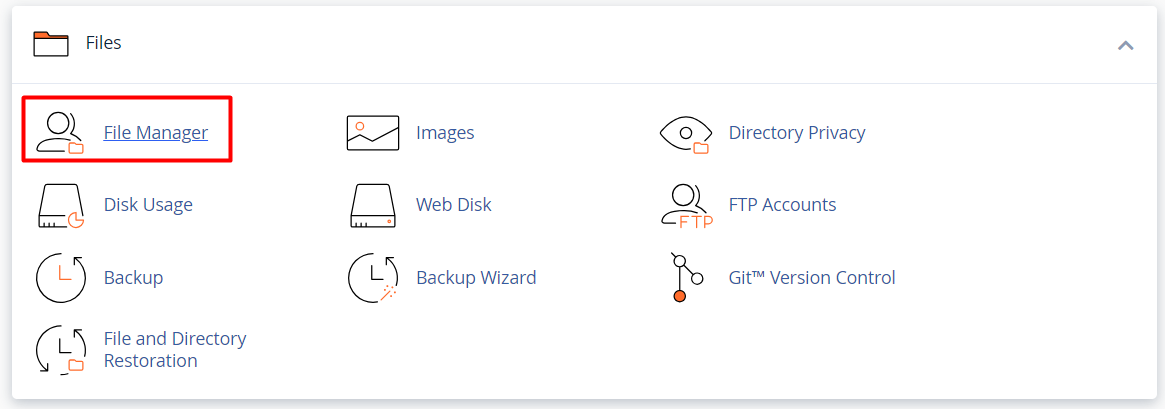
File Manager option - cPanel


Step 3: In file manager, you will see the mail directory or folder.
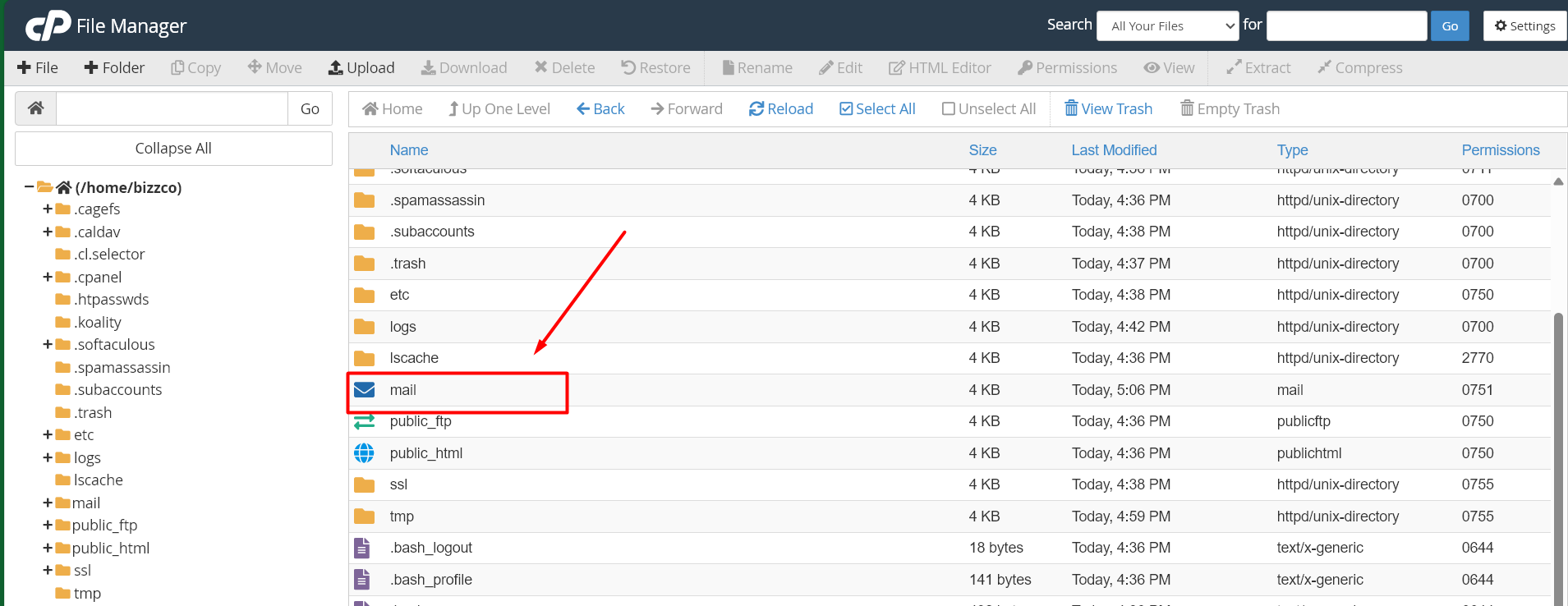
Mail Directory - cPanel


Step 4: Right click on the folder, select “Compress” and choose “TAR Archive” zip format. Click “Compress Files“.
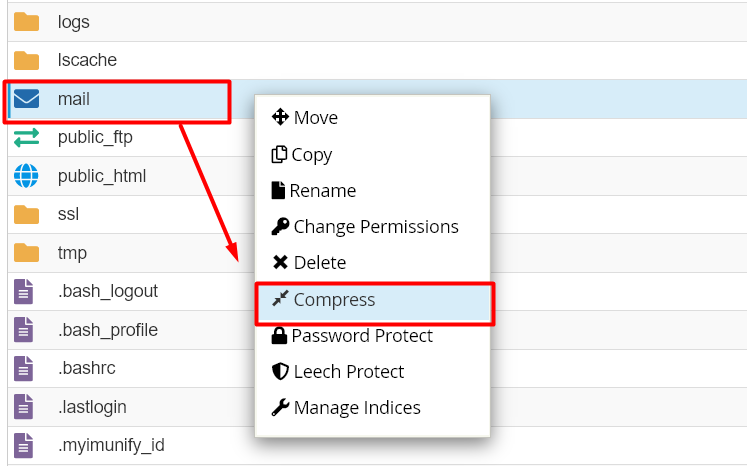
Compress Files option


Step 5: Once compressed, right click on the zip file and select “Download” option to download the zip file.
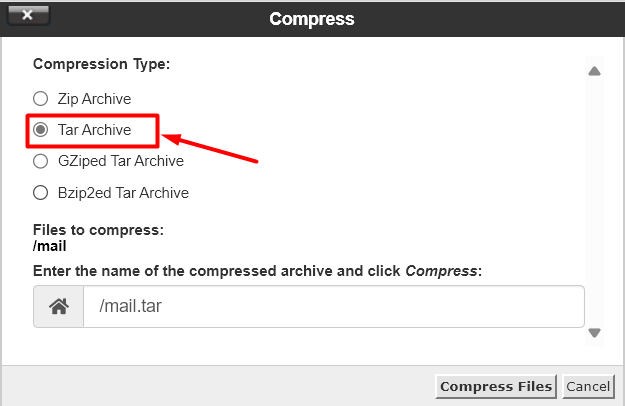
Tar Archive Zip Format


cPanel Export Email Accounts:

Step 1: Like done on step 2 above, go to file manager and delete the mail directory or folder that already exist.
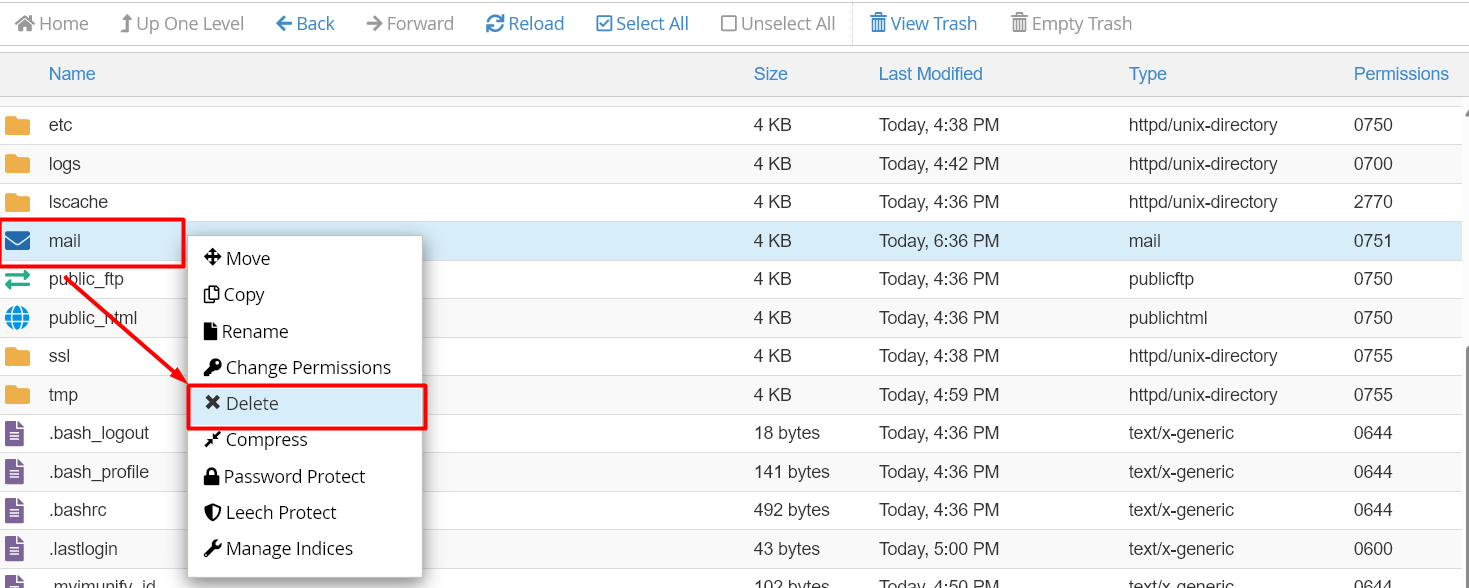
Delete Mail Directory - cPanel


Step 2: Click ‘upload’ on top of the section and upload the zip file downloaded earlier.
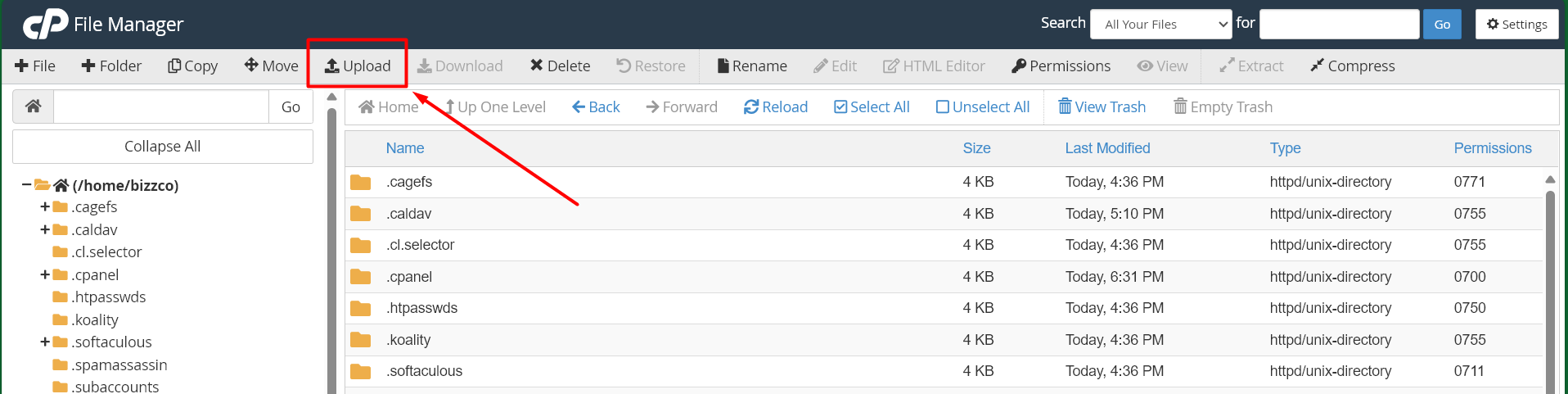
Upload option - cPanel


Step 3: Right click on the zip file and click ‘extract‘. Now all emails should be successfully migrated.
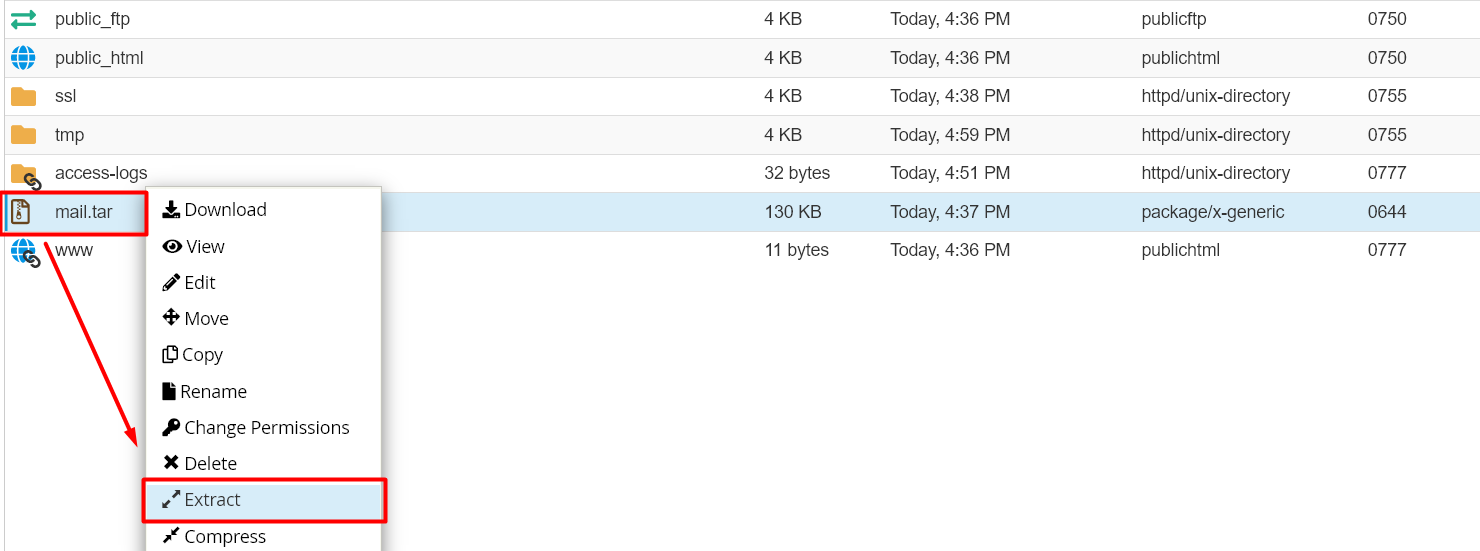
Extract option - cPanel


Step 4: Now go to email section in cPanel and click Email Accounts.
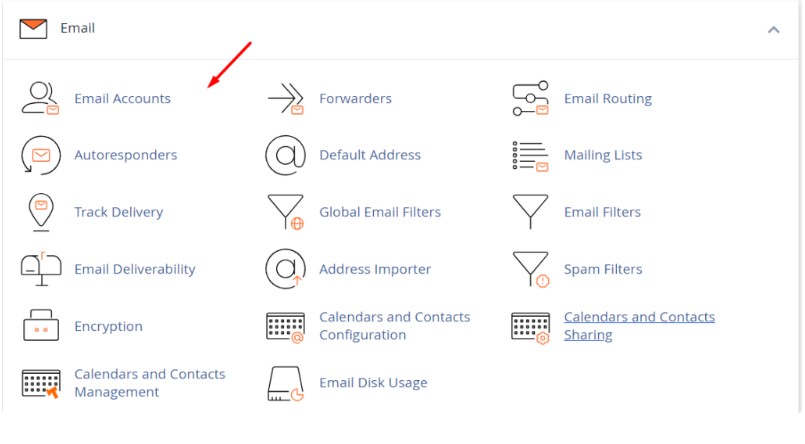
Click email Accounts

Next is to create Create the email account with same username in new hosting cPanel account.
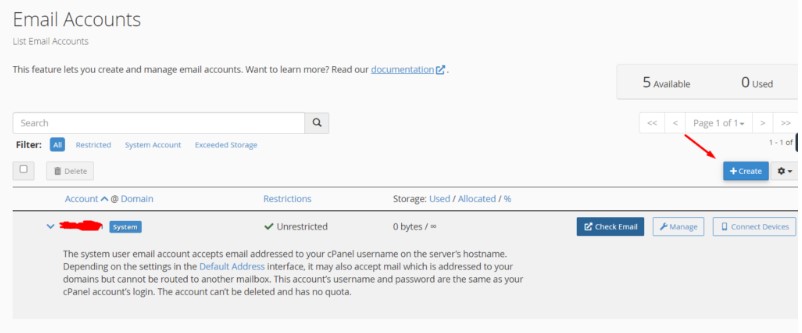
Create email account

NOTE: This will migrate all the email accounts mail created from old hosting. 


Method 2: Download Single Email Account

Step 1: Instead of downloading the mail directory, click the mail directory from file manager and select “domain name“.
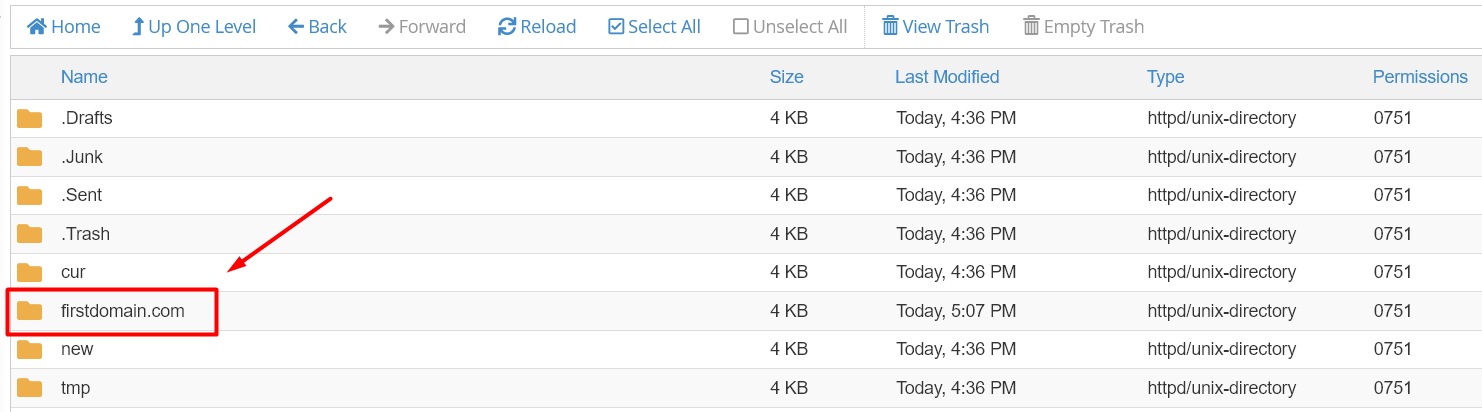
Select Domain Name Directory - cPanel


Step 2: If you have created multiple email accounts under the single domain, then you should choose the respective username folder of the email account. Right click on the username folder and compress as zip file to download it.
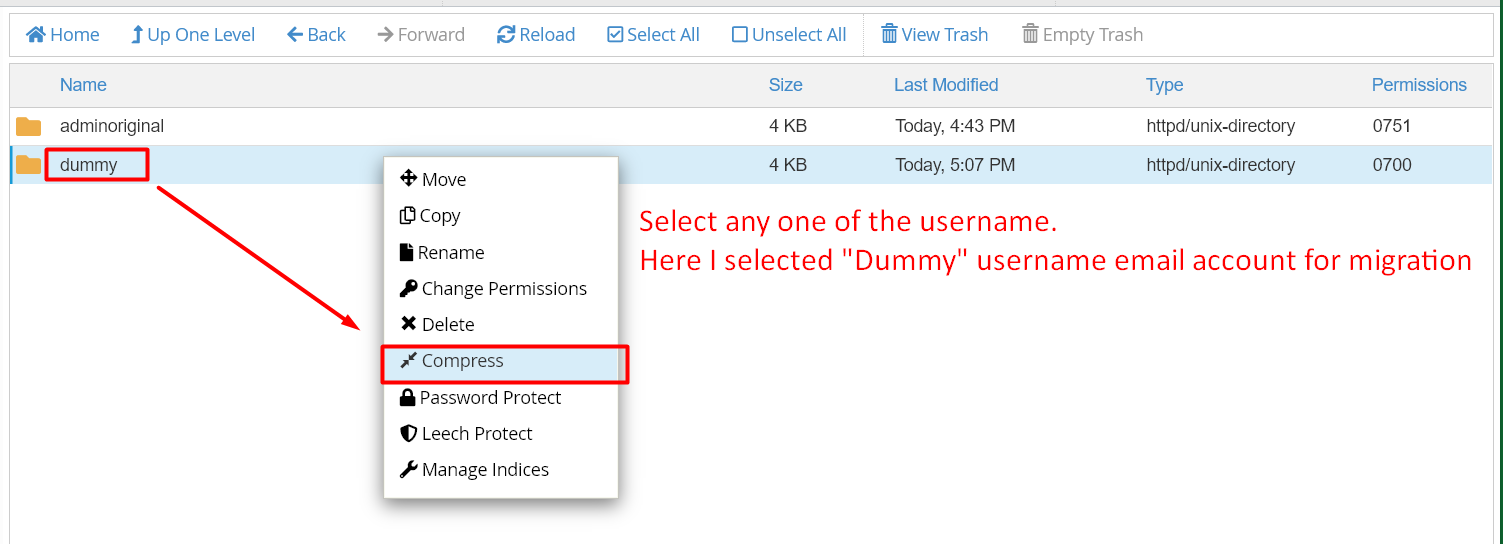
Individual Username Email Account Download


Extract Individual Email Account:

Step 1: Instead of deleting the mail directory or extracting it, click the mail directory from file manager and select “domain name“.

Step 2: Click ‘upload’ on top of the section and upload the zip file downloaded earlier.

Step 3: Now extract the zip file and create the email account with same username.
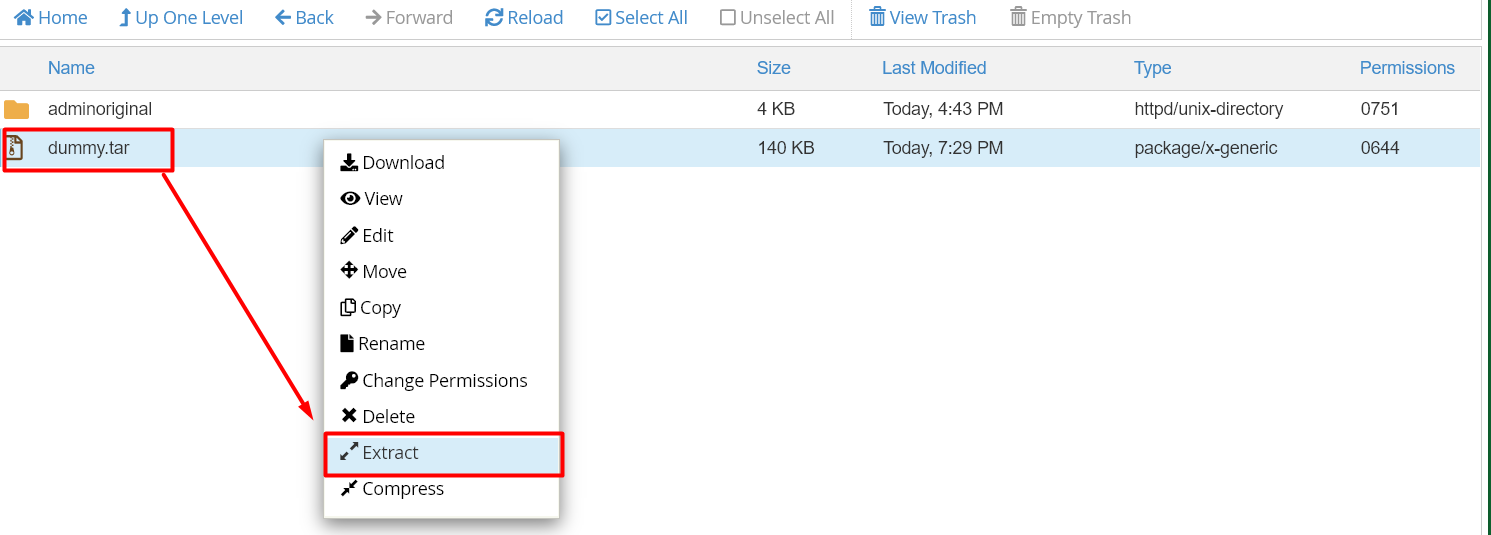
Extract option Single Email Account


Process after Migrate Email Accounts:

Step 1: Once the emails are migrated, you need to update the DNS records for the new email hosting in your domain.

Note: When you update the record, propagation may take up to 24 hours to complete worldwide.

Step 2: After the propagation is complete, send a test mail to check whether the mail is working properly on the new cPanel account.


Hope this article helps you complete the migration and as well as start using email service from new hosting control panel.


Buy cheap .IN Domain

Recent Posts

  • How to Find and Register a Domain Name with Hynts
  • Hynts Features: What SeekaHost India’s AI Domain Tool Can Do
  • CSF Security Advisory September 2026: Critical Vulnerability and Patch Guide
  • How to Change PHP Settings Using MultiPHP INI Editor
  • How Can I Optimize My Reseller Account?
  • Connect with us

Main Packages

  • Web Hosting
  • Email Hosting
  • Business Hosting
  • VPS Hosting
  • Dedicated Servers
  • SSL Certificates

Information

  • Branding
  • Payment Methods
  • Customer Reviews ⭐
  • Information Blog

Domain Name Services

  • Buy a Domain
  • Transfer a Domain
  • Domain Pricing

Domain Tools

  • AI Domain Name Generator
  • Business Name Generator

CMS Hosting Package

  • Managed WP Hosting
  • Magento Hosting
  • WooCommerce Hosting

Control Panel Package

  • cPanel Hosting
  • LiteSpeed Hosting
  • Plesk Hosting
  • Reseller Hosting

Guides & Resources

  • Migrate to Us
  • How To Start A Blog
  • Earn Money Online
  • What is a Top Level Domain
  • How to Register Domain
  • VPS Hosting Guide

Account

  • Sign-In to Your Account
  • Customer Care
  • Knowledgebase
  • Announcements
  • Partner Program
  • Service Status

Legal

  • Terms and Conditions
  • Refund Policy
  • Privacy Policy
  • Report Abuse
logo
  • SeekaHost India Web Services Private Limited

  • Copyright © 2026 | All Rights Reserved.

Top 10 most rated web hosting company in India cPanel Certified Partner
Manage Consent
To provide the best experiences, we use technologies like cookies to store and/or access device information. Consenting to these technologies will allow us to process data such as browsing behavior or unique IDs on this site. Not consenting or withdrawing consent, may adversely affect certain features and functions.
Functional Always active
The technical storage or access is strictly necessary for the legitimate purpose of enabling the use of a specific service explicitly requested by the subscriber or user, or for the sole purpose of carrying out the transmission of a communication over an electronic communications network.
Preferences
The technical storage or access is necessary for the legitimate purpose of storing preferences that are not requested by the subscriber or user.
Statistics
The technical storage or access that is used exclusively for statistical purposes. The technical storage or access that is used exclusively for anonymous statistical purposes. Without a subpoena, voluntary compliance on the part of your Internet Service Provider, or additional records from a third party, information stored or retrieved for this purpose alone cannot usually be used to identify you.
Marketing
The technical storage or access is required to create user profiles to send advertising, or to track the user on a website or across several websites for similar marketing purposes.
  • Manage options
  • Manage services
  • Manage {vendor_count} vendors
  • Read more about these purposes
View preferences
  • {title}
  • {title}
  • {title}

Last Updated on August 12, 2026 by Arshath