


7 Different Ways to Block Bad Bots through .htaccess

By Farhan Danish | August 1, 2026










Blocking bad bots is essential to keep your website secure and free from unwanted traffic, spam, and resource abuse. In this guide on how to block bad bots, you’ll learn practical .htaccess methods using IP addresses, user agents, and referrer rules.
We’ll also walk through how to identify suspicious bot activity and apply these rules through your cPanel to improve overall website protection and performance.
What is .htaccess?
.htaccess is a hidden text file and a short name of Hypertext Access. It is a configuration file, used mostly by Apache web servers that control the directory. If you are using Content Management Systems such as Drupal, WordPress, and Joomla you can easily encounter a .htaccess file. These kinds of files can be edited within it to add rules, which are supported by several web servers.
How to Find Your Site Affected By Bad Bots?
You can find this by checking the website’s log files, which are available under the cPanel Raw Access Logs option. You can download the files and open them in a text editor like Notepad to analyze the raw access logs on a daily basis.
By accessing and view raw access log, you will get insights into malicious bots. Next, cross-check the same bot using bandwidth resource applications like AWSWATS and Webalizer, atlast conduct research on Google to determine whether the bot is harmful or legitimate.
To find the bandwidth consumption, check the bandwidth usage option in cPanel for day to day and month wise usage graph which helps you identify when it consumed more to filter bad bots.
Steps to Access .htaccess:
Step 1: Log into your cPanel account.

Step 2: Click and navigate to file manager under the files section.
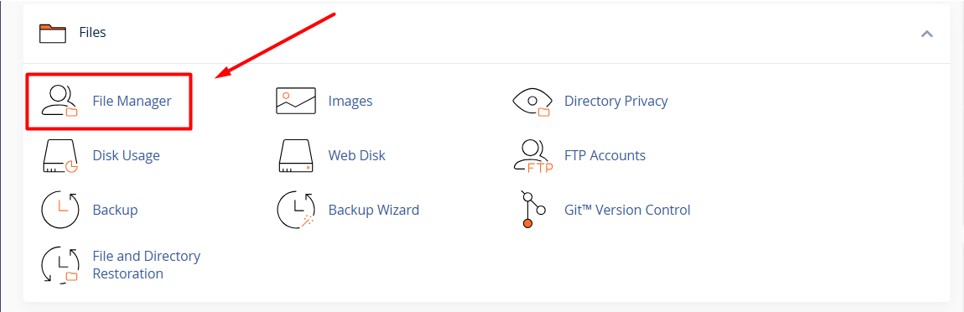
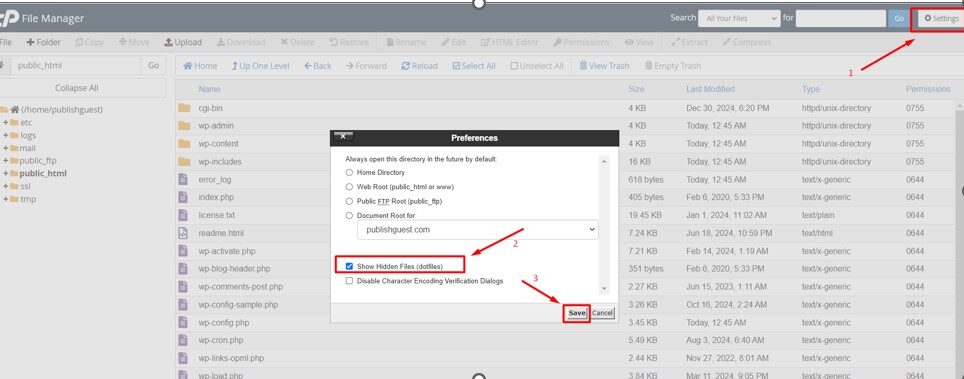
Step 3: Go to public_html Directory and click setting at right side-corner and click Show Hidden Files (dotfiles) as checked and click Save.
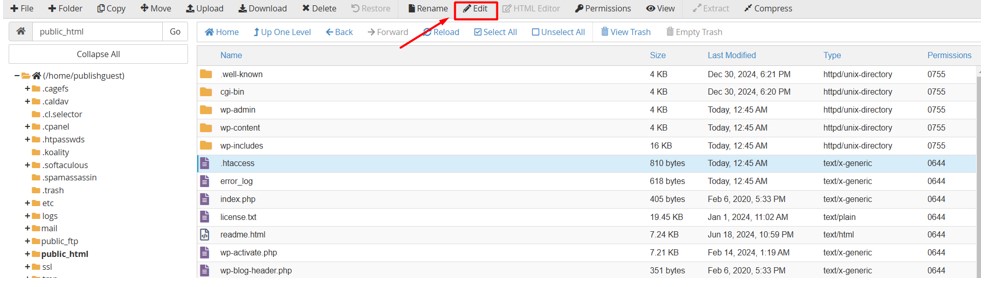
Step 4: Choose the domain under which you would like to edit to .htaccess the domain.
Step 5: Select the .htaccess file and click the Edit option at the top.
Now inside the htaccess file we are going to update the codes to block bad bots based on the usage it consume.
Best Ways to Block Bad Bots:
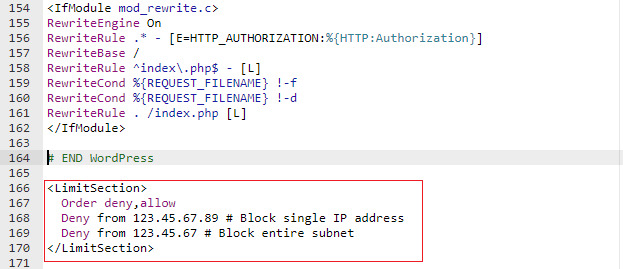
You can add the below code by adding after the default htaccess code as shown above.
1. Block by single-user agents.
If you have to block only one user agent, you can copy and insert.
RewriteEngine On
RewriteCond %{HTTP_USER_AGENT} UserAgentName [NC]
RewriteRule .* – [F,L]
Note: You can replace the actual bot in place of UserAgentName.
2. Block By multiple User Agents.
To block multiple user agents at once .
RewriteEngine On
RewriteCond %{HTTP_USER_AGENT} ^.*(Yandex|Baiduspider|HTTrack).*$ [NC]
RewriteRule .* – [F,L]
3. Block By Single IP Address
To block a single IP, you can use follow the below code.
deny from 11.223.33.1
4. Block by Multiple IP
Use Multiple deny lines from one after another to block multiple IP addresses.
deny from 11.223.33.1
deny from 223.33.42.43
5. Block the Range of IP
If you want to block the specific range.
Use CIDR (Classless Inter-Domain Routing) notation for blocking IPs:
123.123.123.1 – 123.123.123.255, use deny from 123.123.123.0/24
123.123.64.1 – 123.123.127.255, use deny from 123.123.123.0/18
6. Block a single referrer.
If you want to block a single referrer like testing1.com
RewriteEngine On
RewriteCond %{HTTP_REFERER} testing1.com [NC]
RewriteRule .* – [F]
7. Block a multiple referrer.
To block the any referrer for example as follow,
testing1.com
sample.com
RewriteEngine On
RewriteCond %{HTTP_REFERER} testing1.com [NC,OR]
RewriteCond %{HTTP_REFERER} sample.com [NC]
RewriteRule .* – [F]
NOTE: Replace the referrer name with the name which you want to block for your website.