


logo
Login
  • Home
  • Services
    • Close
    • Hosting
      • Web HostingWeb Hosting
        Hosting designed for consistent performance and stability
      • Plesk HostingPlesk Hosting
        Easy-to-manage hosting with Plesk control panel included.
    • CMS Hosting
      • wordpress hostingWordPress Hosting
        Optimized WordPress hosting with speed & security
      • ecommerce hostingWooCommerce Hosting
        eCommerce hosting for growing online stores
    • Servers
      • VPSVPS Hosting
        Virtual servers with dedicated resources and flexible configs
      • Dedicated ServerDedicated Hosting
        Complete control with your own physical dedicated server
    • Domains
      • Business HostingRegister a Domain
        Secure your domain name for your online presence
      • transfer your domainTransfer Domains
        Move your existing domain to our reliable registrar service
    • Domain Tools
      • Business Name GeneratorName Generator
        Create unique, catchy names for your brand
    • Security
      • SSLSSL Certificates
        Secure your site and boost trust with SSL encryption
    • Communication
      • Email HostingEmail Hosting
        Secure, professional email for your business needs
    • Launch
      • host n8n iconn8n Self HostedNew
        Full automation control with your own self-hosted n8n.
  • Quick Access
    • Close
    • .COM domain
    • .IN domain
    • Domain Pricing
    • Adaptive Core Security Suite
  • Resources
    • Close
    • Blog
    • Customer Reviews
site logo
  • Home
  • Domain
    • WordPress Hosting

      Register Domain Name

      Reseller Hosting India

      Business Name Generator

      Domain Checker

      Domain Checker

      SSl certificates

      SSl certificates

      Transfer domains

      Transfer domains

      Domain Pricing

      Domain Pricing

  • Hosting
    • LiteSpeed Hosting

      Cheap Web Hosting

      Reseller Hosting India

      Business Hosting

      WordPress Hosting

      WordPress Hosting

      Email Hosting

      Email Hosting

      VPS Hosting

      VPS Hosting

      Dedicated Server

      Dedicated Server

  • Client area
  • Contact Us

Knowledge from SeekaHosters

How To Start A Blog Earn Money Online Digital Marketing Tips Website Hosting Tips Website SEO
Clear Default Mail Account

How to Clear the Default Mail Account Storage?

How to Clear the Default Mail Account Storage?

By Aravindhan | July 11, 2026

Simplify Article With:
Share Article With: Link copied

In every cPanel hosting account, there is a default mail account automatically created with the same name as your cPanel username. This default mail account is mainly used for receiving server notifications rather than personal or business communication.

Over time, this mailbox can consume disk space, so it is important to manage and clear the storage properly to avoid errors and performance issues. In this guide, you will learn how to safely clear and manage the default mail account storage in cPanel using simple steps.


Steps to Clear Default Mail Account Storage:

Step 1: Login to your cPanel account.

cPanel Login Interface


Step 2: Search  Email Account and click on it.
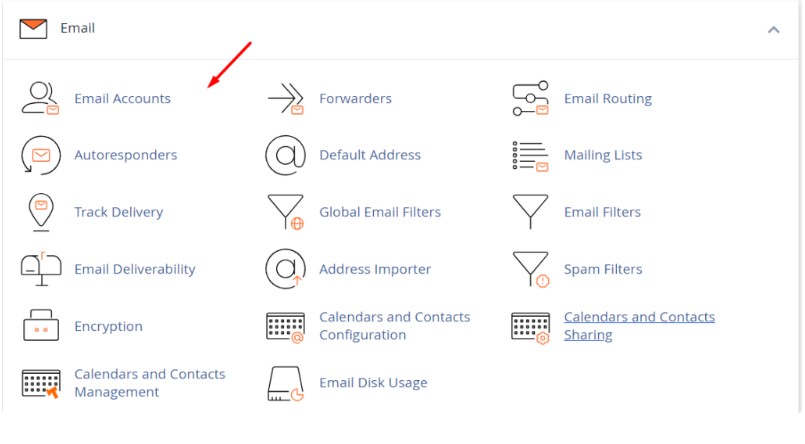
Click email Accounts


Step 3: Find your default mail account and click on Manage.
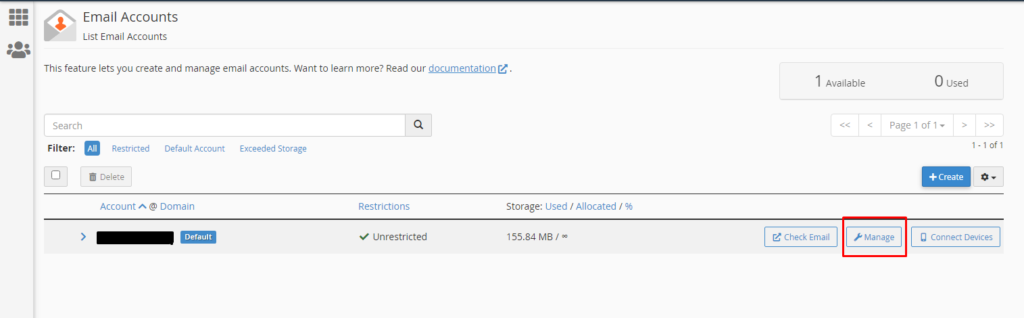
Click on Manage


Step 4: On the Manage page, click on “Free up Email Storage”.
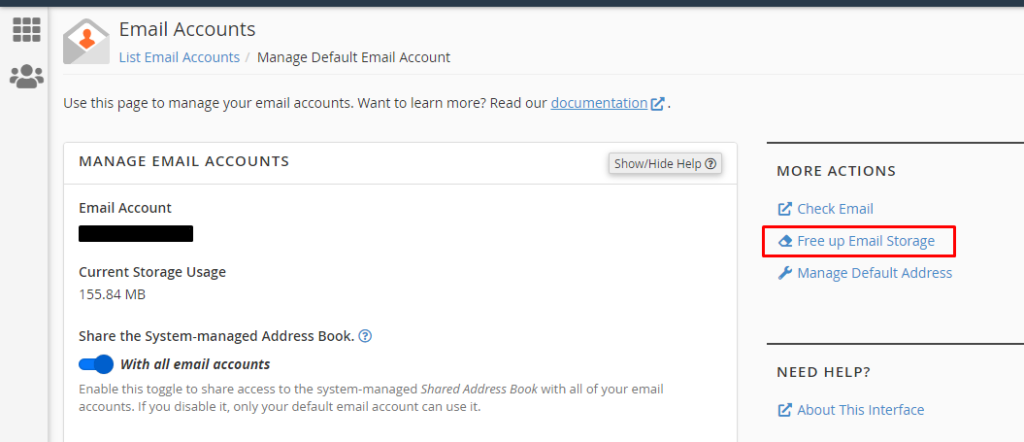
Free email storage


Step 5: You will see folder-wise disk usage of your default mail account.
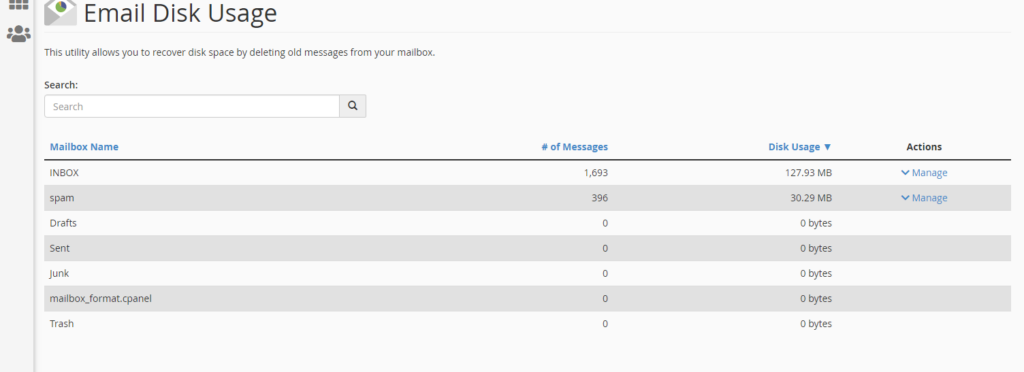
Email space utilized


Step 6: Click on the “Manage” button.  Under the “Messages to delete” dropdown, select “All Messages” and click on the “Delete Permanently” button. The default emails will get cleared.
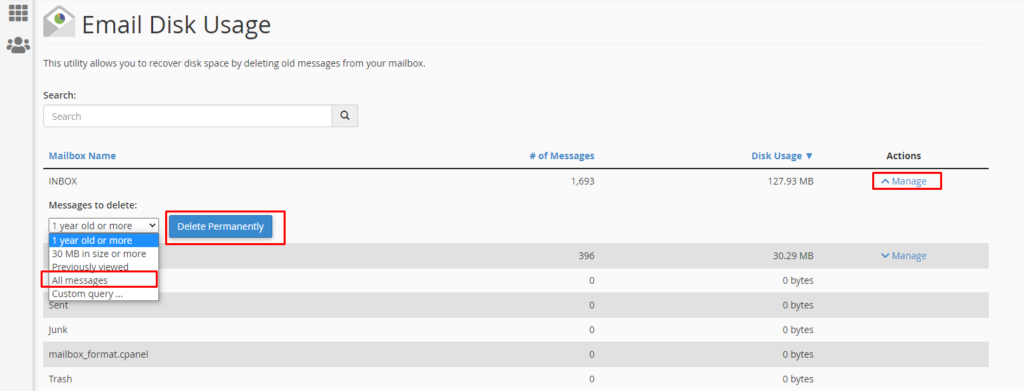
Delete default message


Note: If the disk space is already filled you can’t able to clear the default message using the above method. It shows the fatal error.


Remove Emails from File Manager:

Step 1: Login to your cPanel account.

Step 2: Search for “File Manager” and Click on it.
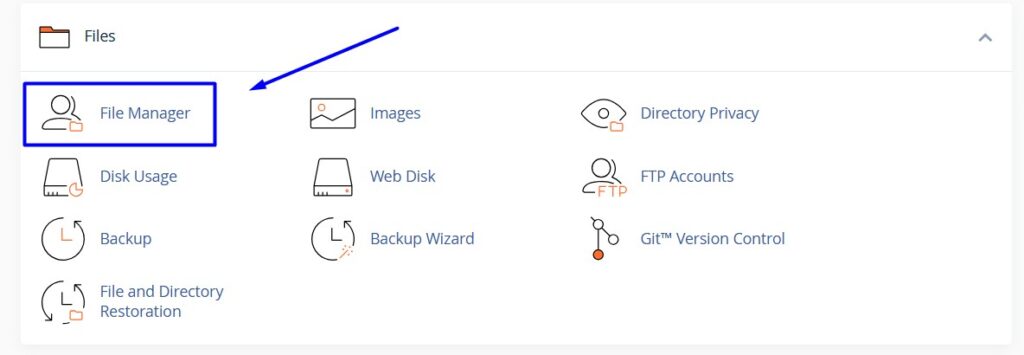
Click File manager


Step 3: In file manager, click Mail folder.
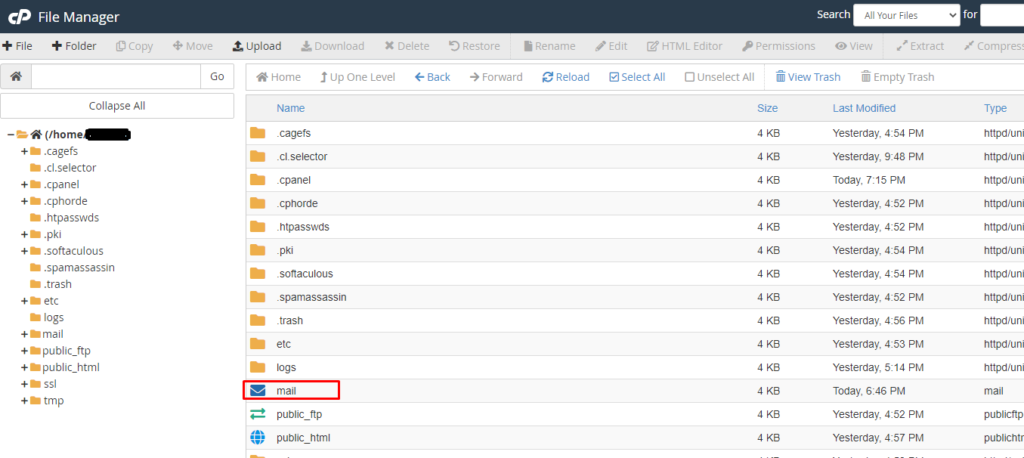
Mail directory


Step 4: In the mail directory, you can find the “New” folder.
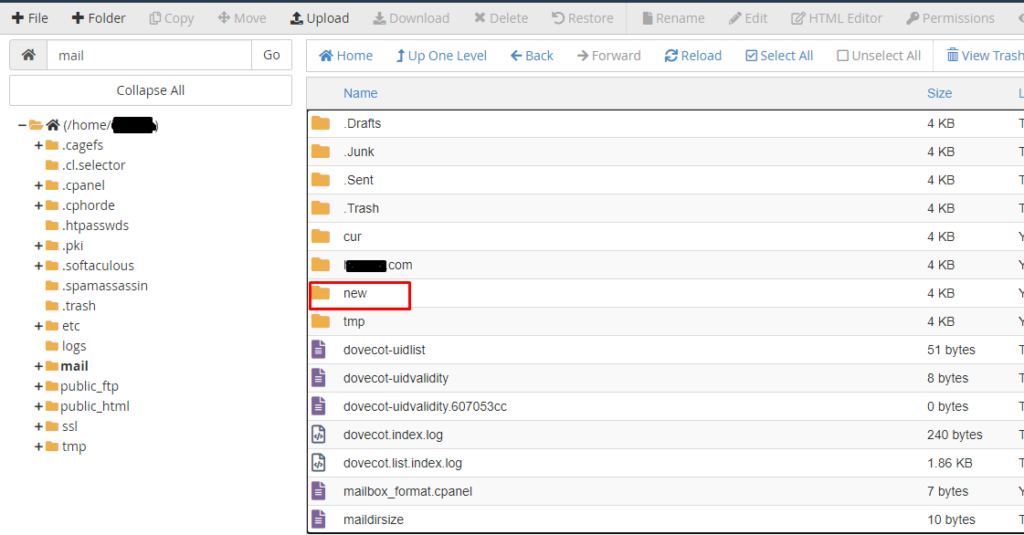
select new folder


Step 5: Right click on the new folder, click “Delete” button on top of the page and click Confirm to delete the folder.
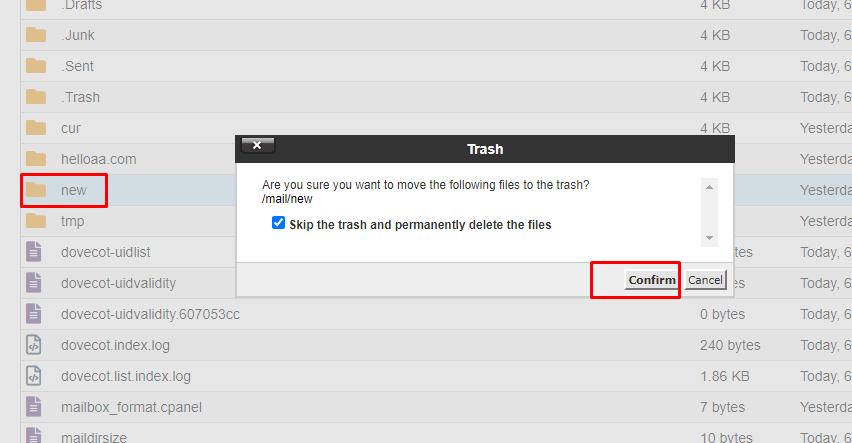
Delete new folder


Step 6: After deleting the “new” folder, create folder with the name “new“again.
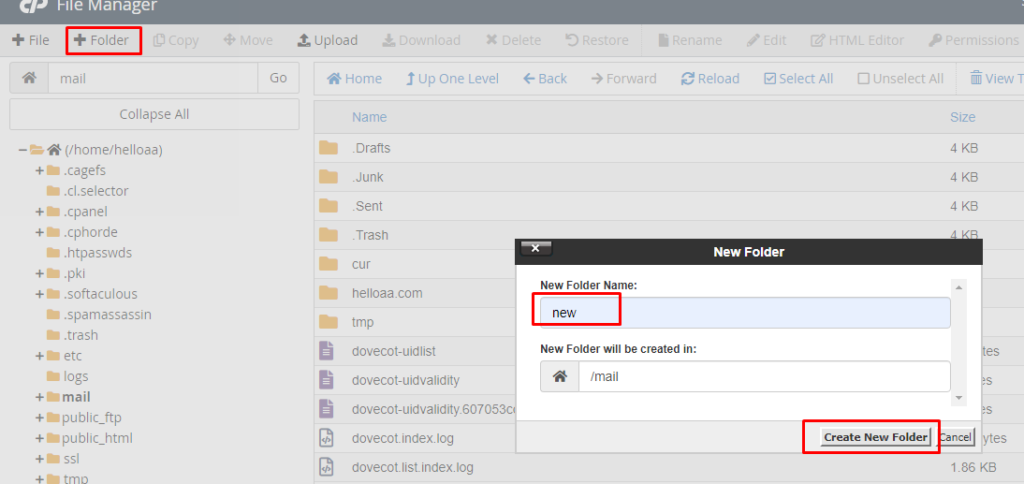
Create new folder


Related Sources:

1. Create custom Email Account in cPanel

2. Migrate Email from cPanel to cPanel

3. Update Email Records in cPanel


Managing your default email account regularly helps prevent storage overflow and server issues. By following the above methods, you can efficiently clear unwanted emails and maintain smooth cPanel performance.

Buy cheap .IN Domain

Recent Posts

  • How to Connect via RDP to Windows Server?
  • Payment Gateway: What is it and How it Work?
  • How to Clear Cache in Chrome Browser?
  • How to Clear the Default Mail Account Storage?
  • How to Create Staging Site WordPress Using Softaculous in cPanel
  • Connect with us

Main Packages

  • Web Hosting
  • Email Hosting
  • Business Hosting
  • VPS Hosting
  • Dedicated Servers
  • SSL Certificates

Information

  • Branding
  • Payment Methods
  • Customer Reviews ⭐
  • Information Blog

Domain Name Services

  • Buy a Domain
  • Transfer a Domain
  • Domain Pricing

Domain Tools

  • Domain Name Checker
  • Business Name Generator

CMS Hosting Package

  • Managed WP Hosting
  • Magento Hosting
  • WooCommerce Hosting

Control Panel Package

  • cPanel Hosting
  • LiteSpeed Hosting
  • Plesk Hosting
  • Reseller Hosting

Guides & Resources

  • Migrate to Us
  • How To Start A Blog
  • Earn Money Online
  • What is a Top Level Domain
  • How to Register Domain
  • VPS Hosting Guide

Account

  • Sign-In to Your Account
  • Customer Care
  • Knowledgebase
  • Announcements
  • Partner Program
  • Service Status

Legal

  • Terms and Conditions
  • Refund Policy
  • Privacy Policy
  • Report Abuse
logo
  • SeekaHost India Web Services Private Limited

  • Copyright © 2026 | All Rights Reserved.

cPanel Certified Partner cPanel Certified Partner

Last Updated on July 11, 2026 by Arshath